
ADA cashback · Gero Dashboard 2.7.1
ADA cashback on everyday shopping, in your own wallet.
Shop online at 750+ retailers through the Cashback tab in GeroWallet and get part of what you spend back as ADA. Powered by Bring, paid to the non-custodial wallet you already hold, with nothing to sign up for.
- 750+ retailers
- Paid in ADA, not points
- Free, no sign-up
Some of the 750+ retailers that pay ADA cashback
- eBay
- Adidas
- Uber Eats
- Wolt
- Walmart
- Shopify
- NordVPN
- Macy's
- bitpanda
- Trip.com
- Coinbase
- PureVPN
- Ray-Ban
- Ticketmaster
- ebuyer
The Cashback tab
How ADA cashback works inside the wallet
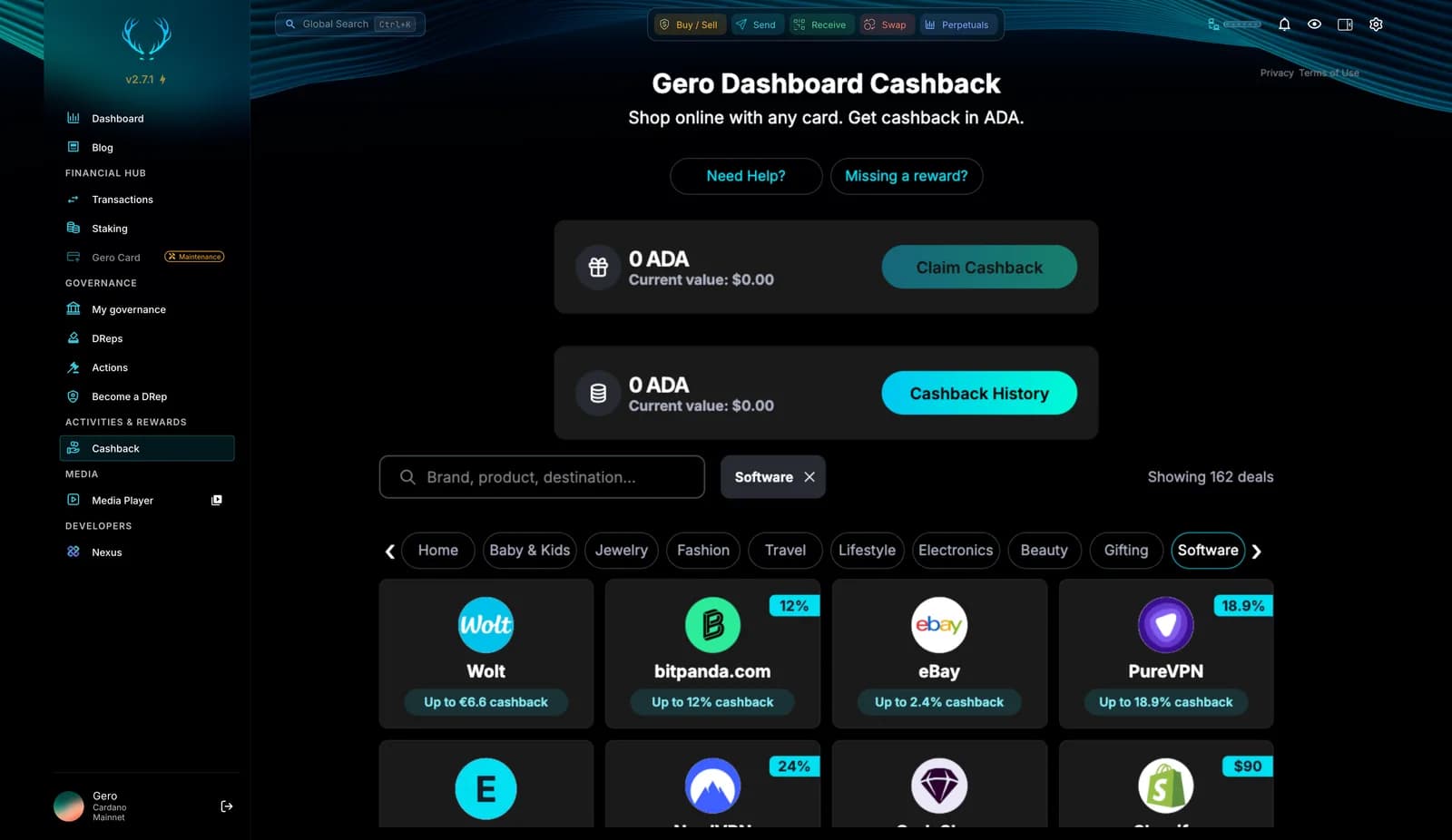
One tab in Gero Dashboard lists every deal, your claimable ADA and your cashback history. The shopping happens on the retailer's site, the ADA lands here.
- Every deal shows its rate before you click. The Cashback tab lists each retailer with the rate it pays right now, filtered by category or searched by brand.
- Shop the way you already do. Click through to the retailer from the wallet and pay however you normally pay. Bring tracks the purchase; nothing about your checkout changes.
- Gero tells you when a site pays cashback. Land on a partner retailer and the extension pops up so you can activate cashback before you buy. Shop & Earn pop-ups can be switched off in Advanced settings.
- ADA, not points. Confirmed cashback appears in the wallet as ADA you can claim, then stake, swap or hold like any other ADA.
- Free, no sign-up. No membership, no fees and no account beyond the wallet you already have. Your keys stay yours the whole way.
The list changes all the time as retailers join and promotions come and go. Open the Cashback tab for today's deals and the rate each one pays.
Powered by Bring, the cashback network behind the tab Powered by Bring, the cashback network behind the tab
Step by step
How to Earn ADA Cashback in GeroWallet
- 01
Open the Cashback tab
In Gero Dashboard, choose Cashback in the sidebar. Browse by category or search for a brand, product or destination.
- 02
Click through to the retailer
Open the deal from the wallet, or wait for the Gero pop-up when you land on a partner site. Either way the purchase is tracked by Bring. Pay however you normally pay.
- 03
Wait for confirmation
Once the retailer confirms the order, the cashback shows in the wallet as pending, then as claimable. Timing depends on the retailer.
- 04
Claim your ADA
Press Claim Cashback and the ADA lands in your wallet. From there, stake it, swap it or keep it. Cashback History keeps the record.
Earn, top up, spend
Spend your cashback with the Gero Card
Cashback lands in your wallet as ADA. Top up the Gero Card, the Cardano card on Mastercard, with that ADA and spend it anywhere Mastercard is accepted. Then shop through the Cashback tab and do it again.
Explore the Gero Card
ADA cashback questions
How does ADA cashback work in GeroWallet?
You open the Cashback tab, pick a retailer and click through to their site from the wallet. Bring tracks the purchase, and once the retailer confirms it the cashback appears in the wallet as ADA you can claim. Nothing about how you pay at the retailer changes.
Is ADA cashback free?
Yes. There is no membership, no fee and no separate account. The only thing you need is GeroWallet, which is free, and the ADA you claim is yours in your own non-custodial wallet.
Which retailers pay ADA cashback?
Over 750 retailers across categories such as fashion, electronics, travel, food delivery, software and home. Examples in the wallet include eBay, Wolt, bitpanda, NordVPN and Shopify. Browse the full list and the current rate for each in the Cashback tab.
How much cashback can I earn?
It depends on the retailer. Each deal in the Cashback tab shows the rate it pays at that moment, and rates change with promotions, so the wallet is the place to check rather than this page.
When do I get the ADA?
After the retailer confirms the purchase, which can take from a few days to a few weeks depending on their return window. The cashback shows as pending first, then as claimable, and Claim Cashback sends it to your wallet.
Is there a minimum purchase?
No minimum from Gero or Bring. Individual retailers set their own terms, and some categories, such as gift cards, can be excluded from cashback.
Can I combine cashback with coupons and sales?
Usually yes. Cashback is tracked on the purchase you make, so retailer discounts and sales still apply. Some retailers restrict stacking with certain coupon codes, and the deal terms say so.
Will Gero tell me when a site pays cashback?
Yes. With Shop & Earn pop-ups on, the extension shows a notification when you land on a partner retailer, so you can activate cashback before you buy instead of remembering to start from the wallet. You can switch the pop-ups off in Advanced settings.
Can I spend my cashback with the Gero Card?
Yes. Cashback lands in your wallet as ADA, and the Gero Card is a Mastercard you top up with ADA from the same wallet. Claim your cashback, top up the card and spend it online, in stores and at ATMs. The card itself does not pay cashback; the two work side by side.
What is Bring?
Bring is the cashback partner behind the Cashback tab. It runs the retailer network and the purchase tracking, while GeroWallet is where you browse deals and receive the ADA. Your keys never leave your wallet at any point.
Cashback is one part of the wallet
Staking
Delegate the ADA you earn to any pool and let it keep paying every epoch.
Swap
Turn cashback ADA into any Cardano token on six verified DEXs.
Cardano wallet
The wallet around the cashback: staking, governance, Midnight and hardware wallets.
Download
Free for Chrome, Brave, Edge and AVG Secure Browser.
Get ADA back on what you already buy
Free on Chrome, Brave, Edge and AVG Secure Browser. Non-custodial, open source, and the ADA is yours to stake or swap.